Solutions · Sales CRM

A sales CRM that keeps every deal moving

AI scores every new lead, each stage sets the next tasks, and the head of sales sees the whole pipeline on one screen. Stages, fields and rules follow your process, and it runs on your servers.
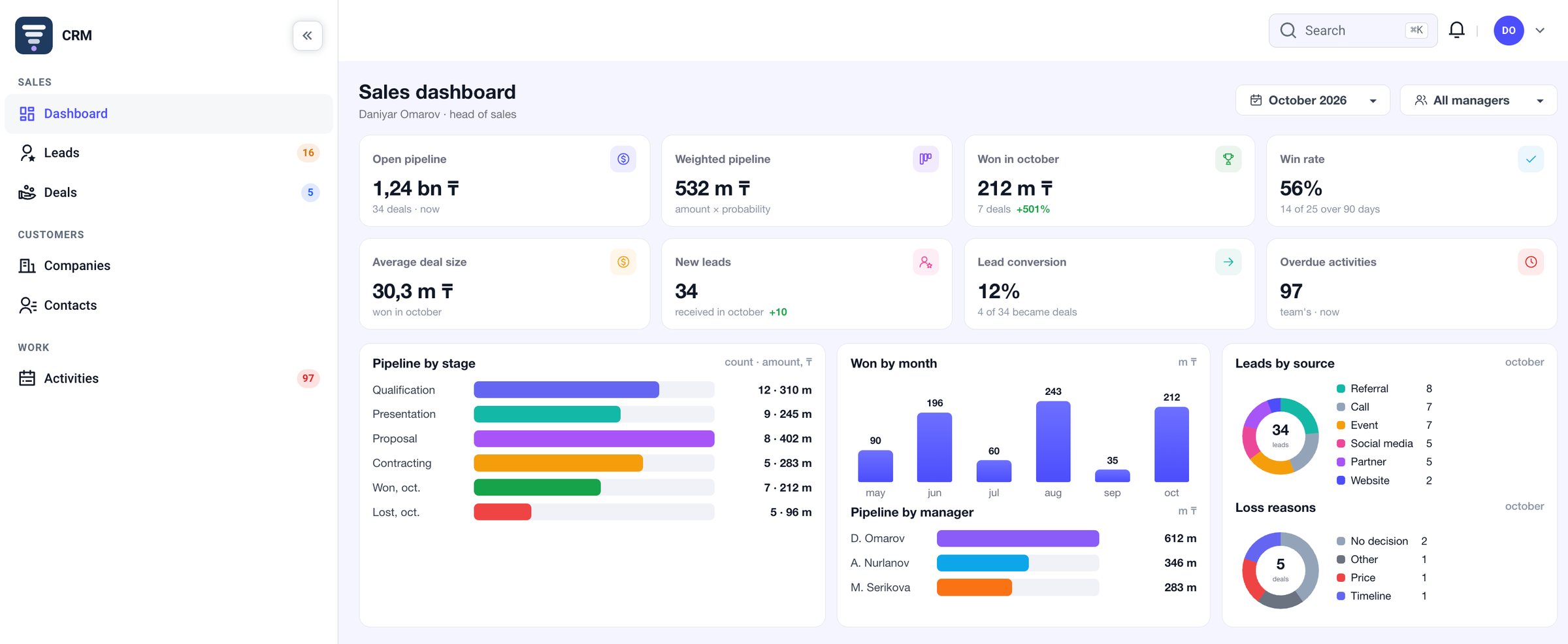
Expresso · Sales CRM · Sales dashboard
Sales dashboard: open and weighted pipeline, wins in October, win rate, lead conversion, pipeline by stage and manager, lead sources and loss reasons
✦ AI lead score
50 / 100Warm lead

A planned budget, but the need is not confirmed yet. 3–6 months; the contact influences the decision.


↻ Deal moved to Proposal
2 tasks created
Prepare and approve the proposalin 3 days
Call for feedback on the proposalin 3 days
Built on Expresso, the platform in production atKcellFreedom Telecom

What changes for your sales team

Four problems every growing sales team runs into, and what the CRM does about them.

One live pipeline

Every deal sits on one board with its stage, amount and probability. No weekly spreadsheet to find out where the quarter stands.

Next steps set by the process

When a deal moves to a new stage, the CRM records the move, updates the probability and creates that stage's tasks with due dates.

Hot leads called first

AI scores each new lead from 0 to 100 and explains why, so managers start with the leads most likely to buy.

History stays with the client

Contacts, deals and every change sit on the company card. When a manager leaves, the history stays.

A look inside the CRM

Real screens of the demo CRM. Everything you see is configuration on the Expresso platform, so it changes to fit your process.

Pipeline

Move deals on a Kanban board

Drag a deal to the next stage. Each column shows how many deals it holds and their total, and every card shows the amount, close date and owner.
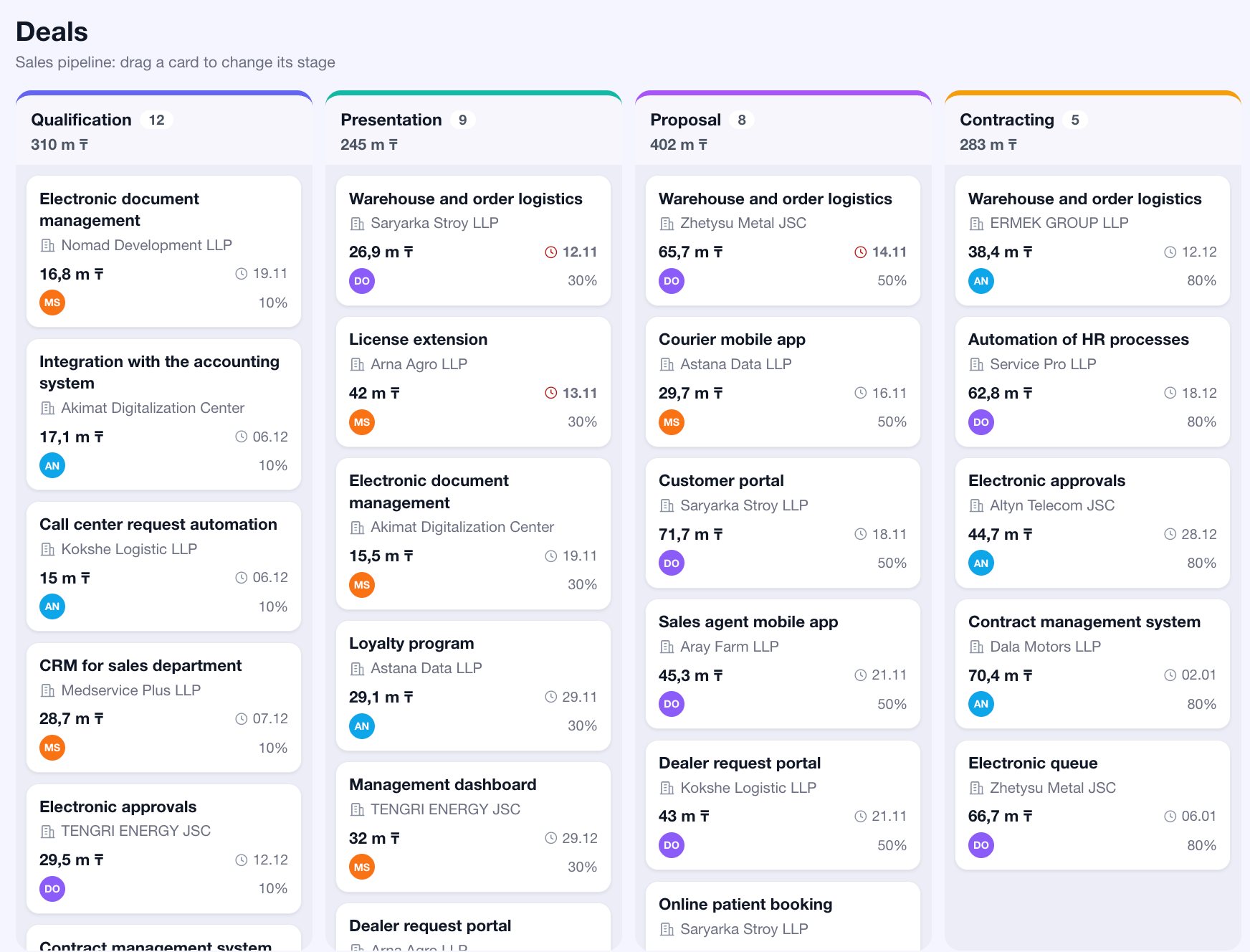
  • Probability set by stage: 10, 30, 50, 80%
  • Stage tasks created with due dates
  • Table view with search, filters and Excel export
Expresso · Sales CRM · Pipeline
Deals on a Kanban board: Qualification, Presentation, Proposal and Contracting with counts and amounts
Open full size ↗
Leads

AI tells you which leads to call first

Each new lead gets a score and a short reason based on budget, authority, need and timing. One click on Qualify creates the company, the contact and the deal.
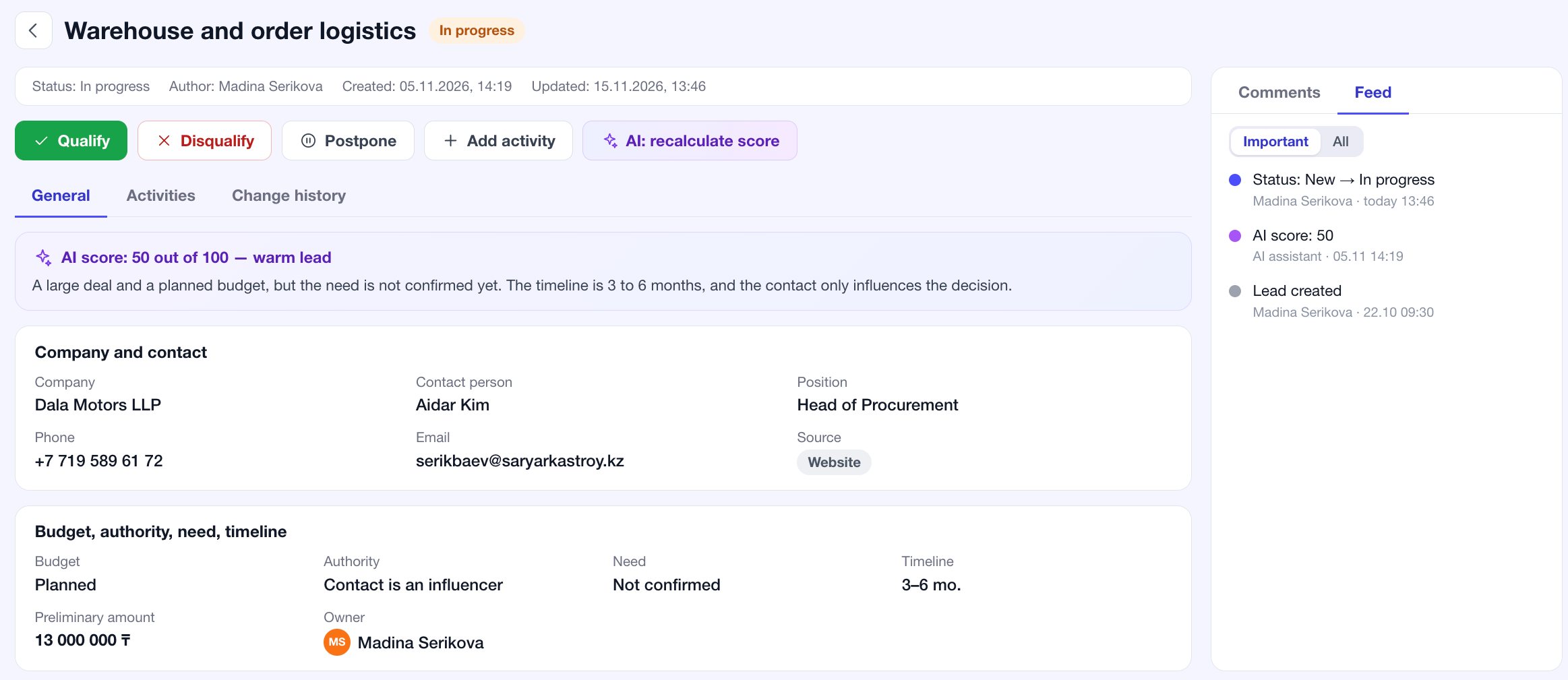
  • Finds the existing company by BIN or name
  • Finds the contact by email or phone
  • Disqualify with a required reason
Expresso · Sales CRM · Leads
Lead card with the AI score 50 out of 100 and its reason, company and contact, and budget, authority, need and timeline
Open full size ↗
Deal card

Every deal has a next step

The stage bar, amount and close date, the open tasks with their deadlines and the full history of stage moves. Overdue tasks turn red.
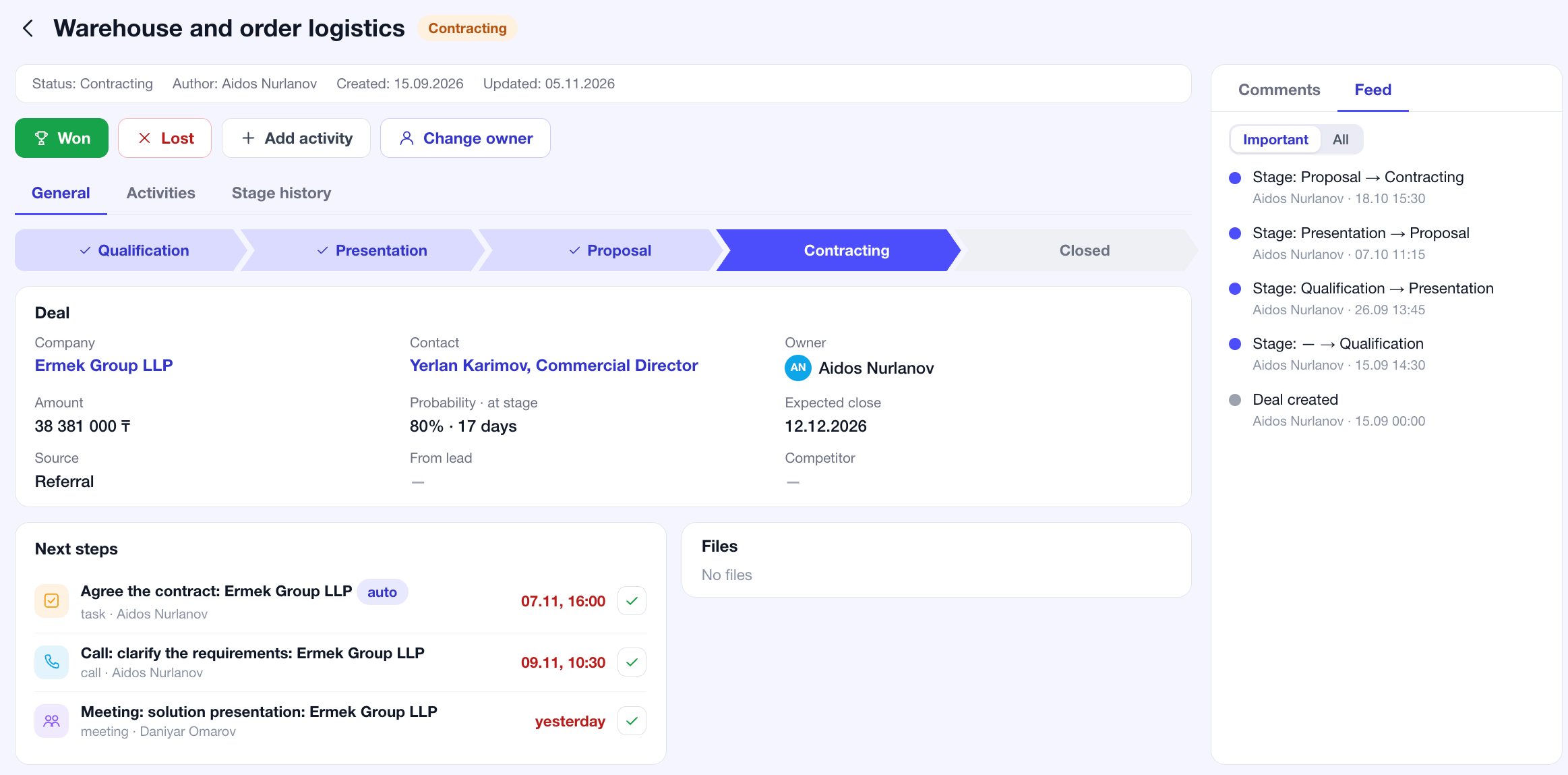
  • Tasks created by the stage rules are marked auto
  • Close as won or lost; a loss needs a reason
  • Every stage move is written to the feed
Expresso · Sales CRM · Deal card
Deal card with the stage bar at Contracting, next steps with an auto-created task and the feed of stage moves
Open full size ↗
Companies

Everything about a client on one card

The profile with BIN and segment, contacts with their role in the decision, open deals and a feed of wins, losses and changes.
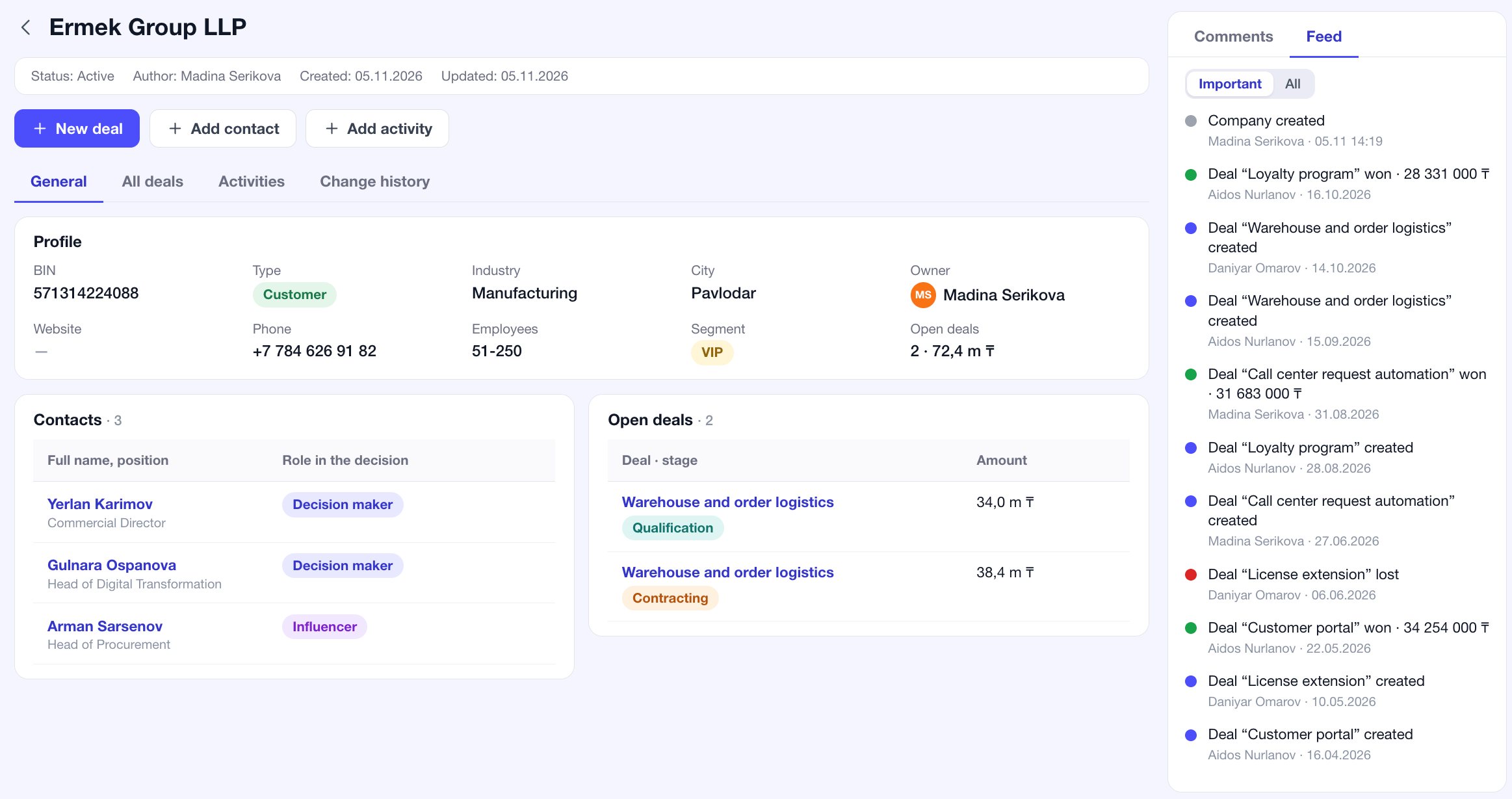
  • Decision makers and influencers at a glance
  • All deals and activities of the company
  • Change history for every field
Expresso · Sales CRM · Companies
Company card with profile, contacts and their role in the decision, open deals and a feed of won and lost deals
Open full size ↗

The routine runs on its own

Rules run as processes on the platform, so the CRM follows your sales process instead of relying on memory.

A new lead arrivesCreated by a manager or from a form
AI score from 0 to 100
A short reason: budget, decision maker, timing
70 and above marked hot
A lead is qualifiedOne click on the lead
Company found by BIN or name, or created
Contact found by email or phone, or created
Deal opened at Qualification
First tasks set with due dates
A deal moves to the next stageDrag on the board or one button
Probability updated
Move written to the stage history
Stage tasks created with due dates
A deal is won or lostOne button and a short form
Close date recorded
Open tasks cancelled
Loss reason required
First win turns a prospect into a customer
Any record changesBy a person, a process or AI
Who, when and what, in the record's feed
Field-level change history

AI that helps managers prioritise

AI works inside the process, not in a separate chat. It suggests; your team decides.

Lead scoring

Every new lead gets a score from 0 to 100 and a two-line reason. Managers can rescore a lead with one click when they learn more.

Only the data it needs

The scoring agent gets the lead's fields from the process. It has no tools to read or change other records.

The model your IT approves

The CRM reaches models through the platform's AI gateway, so your IT team chooses the model. Every call is logged.

Shaped to your sales process

The CRM is configuration on Expresso, not a fixed product. Your administrator changes it in Studio without a release, or our team does it for you.

Fields and reference lists
Stages and probabilities
Stage tasks and deadlines
Roles and access rules
Screens and dashboards
AI prompts
Kazakh, Russian and English
1

Change in a branch

Work on a copy of the configuration while the team keeps selling in production.

2

Review the difference

A pull request shows exactly what changes: fields, forms, screens and processes.

3

Accept, or undo

Accepted changes reach production in one step. Every change is journaled and can be undone.

The same platform runs approvals, documents with e-signature and service requests, so the CRM works together with the rest of the company instead of being one more island.

Ready for your IT and security review

The CRM runs on the Expresso platform, which is in production on-premises at enterprise customers.

On your servers

On-premises or in a private cloud, on Kubernetes. Client data stays in your perimeter.

Access by role

Managers see their own leads and deals; the head of sales sees the whole team. Rules go down to rows and fields.

Every change on record

Who changed what and when, for people, processes, AI agents and integrations.

Your systems connected

Accounting, website or telephony connect through REST APIs, webhooks and processes. Each integration is scoped after discovery.

From a demo to your pipeline

We start small and prove the fit on one sales team before a rollout.

Book a demo
1

Demo, 30 minutes

The live CRM: dashboard, pipeline, AI lead scoring and a stage change with its tasks.

2

Discovery

One or two meetings on your stages, roles, data and integrations.

3

Pilot

The CRM configured to your process for one sales team.

4

Rollout

Your data moved from Excel or your current CRM, training and integrations.

Questions sales leaders ask

Can we change fields, stages and rules ourselves?

Yes. An administrator adds fields and reference lists in Studio without code. New stages, rules and screens are configured by your team or ours, in a branch that is reviewed before it goes live.

Where is our data stored?

On your servers or in a private cloud, as you decide. The platform runs on Kubernetes, and its license works offline.

Which AI model does it use, and does our data leave the perimeter?

Your IT team chooses the model; the CRM calls it through the platform's AI gateway and every call is logged. The scoring agent receives only the lead fields it needs.

Can you move our data from Excel or another CRM?

Yes. At launch our team moves your companies, contacts and deals and maps the fields to yours.

Does it connect to 1C, our website or telephony?

The platform connects them through REST APIs, webhooks and processes. Ready-made connectors are not part of the CRM; each integration is scoped and estimated after discovery.

Why not a SaaS CRM?

If a standard cloud CRM fits your process, it is a good choice. Expresso fits when your sales process is specific, data has to stay on your servers, and the CRM has to work with your other processes, such as approvals, documents and service requests, on one platform.

How long does it take to launch?

It depends on your process, data and integrations. We give you a timeline after discovery, before any commitment.

More solutions on Expresso

Execution Engine

From board decisions to daily execution: goal cascade, company reports read by AI, early warnings and assignments.

Learn more →

All solutions

Ready-made apps on Expresso, and the systems our customers build on the same platform.

See all solutions →

See the CRM on your sales process

Book a 30-minute demo. Bring your stages and a few real deals: we will show them on the pipeline and answer your IT team's questions on hosting and security.

Book a demo
30 minutes · online